


poe2filter.com - A PoE 2 custom loot filter generation website
|
You mean regular tablets or uniques? Unique tablets are treated like other uniques. For regular tablets, in fact I don't get their prices from poe2scout -- although I treat them like currency (for all intents and purposes when they drop that's fine), they're not really currency in the game (e.g. they have an amount of uses). So I 'hard-code' their values. You can still drag them around in the currency drop tiers though.
But I see what you mean, and no, that's currently not possible, sorry. You'd need to style them using custom cosmetic rules... Given they wouldn't automatically move around the tiers based on economy data anyway, you don't have that downside. By the way, there's a big chance tablets will change considerably in 0.5, or maybe they'll even disappear entirely. Author of https://poe2filter.com and https://poe1filter.com - Path of Exile 1 & 2 Custom Filter Generators
|

|
" I see, i was hoping it could work similar to how you can change only the icon for waystones or gold inside cosmetic > items, like it automatically applies to normal, magic and rare I wanted to do something like that to tablets and essences but i guess isn't possible? Speaking of cosmetic, i got some ideas that i want to share about the filter: - Ability to customize quest items, keys and relics inside the quick filter page - Add the rest of the beam colors to the color 'wheel' like green, grey and pink And with all the beam colors available, give us the ability to manually add more tiers if we want to, similar to "add custom cosmetic rule" Sometimes i want to make a cosmetic change to a couple of items at the same time and having a tier dedicated to it would be more intuitive to me, at least one tier for every available beam color seems pretty reasonable to me Speaking of tiers and the tier list, it'd be nice if we could disable/alter the beam and map icon from tiers inside the cosmetic tab, for example: I wanted all skills gems to have cyan text, but highlight beams only for level 20 gems, i had to make 2 rules for this, one affecting lvl 1-19 gems and the other affecting only lvl 20, this overrides the tier highlight beam but this is less intuitive than disabling a beam imo, also because the 'less than/greater than' thingy isn't available for gems, i could've made this change with 1 rule instead of 2 And speaking of Rules: - "Re-order rules" always visible and easy to find, not locked to the same spot at the top - When cloning a rule, add the clone below the original instead of the bottom of the screen, and also highlight the clone briefly just to make it easier to spot |

|
" If you just want to change the icon, that should be possibly with a 'partial' 'custom cosmetic rule' for all tablets or all essences, no? " A feature that's been planned for a long time is to, from the quick filter tier picker, immediately select any custom style. About more tiers: I actually tried that at some point, but it was too confusing compared to the added functionality. Perhaps if at some point I add an 'advanced features' toggle or something! :) " Hm, yeah, it's because in PoE2 uncut skill gems are a currency item, they're treated like any other one; and so you'd always run into the issue that either you create a *partial* cosmetic rule for e.g. the text color, but then the higher-tier ones will override that; or you don't create partial cosmetic rules, but then you have to create different rules for each of the tiers yourself... I don't really see a way around that. Do you see a solution? " Good suggestion about the cloned rule, will look into it. And yeah, the re-ordering is a bit old-school isn't it. It's also to not have to use up space for a 're-order handle bar', though. Maybe I'll add a setting to switch between these two modes... :) Author of https://poe2filter.com and https://poe1filter.com - Path of Exile 1 & 2 Custom Filter Generators
|
|
" It doesn't work, with partial enabled the icon will always be the one used for tiers (in this case a circle), and with partial disabled it overrides the tiered text color to the default beige which is not i what i want If i only wanted to change essences i guess i could change the icon from tiers and make exceptions with rules, but i want both essences and tablets to have different icons " You could make it so that only the default tiers (A-E) can be affected by poe2scout, and the extra tiers are just extras, mainly used for multiple cosmetic changes at once We have 7 tiers and 11 beam colors, we just need 4 more tiers until we have 1 color for every tier, i think this is pretty reasonable compared to adding all the letters from the alphabet like i suggested once before lol " I don't know how this works intrinsically, my suggestion was to somehow forcibly disable the beam from appearing, you know how we check a box to enable the beam right? So i imagined a little box next to it saying "disable beam" for example Or just make any custom rule have priority over the tier? And both the beam and the text colors are "blank" by default the moment you make a rule, so it'd always try to get the color from the tier list first, and if you don't want that, you have to manually select a color But again i have no idea how this works or even if this is possible, and the way i describe it is probably not that good either |
|
|
PoE1: Currency Exchange values - v1.1.152 - 10/05/2026
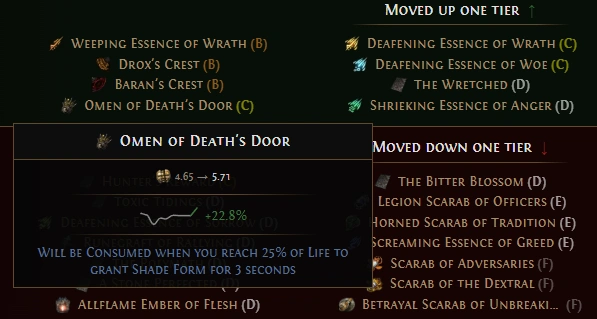 Currency data is now fetched directly from the ingame Currency Exchange instead of poe.ninja. We update currency values every 4 hours. The number we use is a robust, adaptive moving average that smooths noise (using EWMA) and ignores extreme outliers (using MAD), while still tracking real price moves. 'High confidence' means we saw enough activity and the price didn’t jump wildly versus our last update. For now, Unique & Cluster Jewel values are still pulled in from poe.ninja. In a future update, we will also collect these values ourselves, which will enable many interesting features like market-value Base Type tiering, improved Uniques tiering, etc. Other updates - Fixed a bug where the custom selection of 'Other Special Jewellery Base Types' was not taken into account (thanks mcswayer). - Tweaked some of the Crafting Base Type presets. - For new filters, the 'My Jewellery' presets are again no longer set. We incorrectly added those back in v1.1.148, but this had been deprecated in favour of the above-mentioned 'Other Special Jewellery Base Types'. - Because of that, 'Cord Belt' is now also available as 'Other Special Jewellery Base Types'. We took precautions to never miss such special jewellery again. Author of https://poe2filter.com and https://poe1filter.com - Path of Exile 1 & 2 Custom Filter Generators
|
|
|
Currency Exchange values & Save to File - v1.1.153 - 13/05/2026
Currency data is now fetched directly from the ingame Currency Exchange instead of poe2scout.com. We update currency values every 4 hours. The number we use is a robust, adaptive moving average that smooths noise (using EWMA) and ignores extreme outliers (using MAD), while still tracking real price moves. When there wasn't much activity or the price jumped wildly, we mark the price as 'Low Confidence'. Uniques prices are still scraped from the game's Trade website and updated about once per day. Once GGG opens up the 'Public Stash API' for PoE2 (presumably at v1.0 of the game), we'll use that too. This which will enable many interesting features like market-value Base Type tiering and improved Uniques tiering. Save to File Don't like the sync delays imposed by GGG, nor manually copy/pasting filter output to your .filter file? Instead of simply 'downloading' your filter, you can now directly update the file on your hard disk. All that's left to do is refreshing in-game! Every one of your filters can be linked to their own specific file. And when the economy updates, if your filter is linked to a file, it automatically saves! Other updates - Added a 'Max Area Level' for Leveling Gear. It used to be set to level 70 implicitly, now it is explicit. - Added an Explainer for Tier Lists, as I noticed multiple people did not know of certain features. - Fixed the 'Presets' Dialog accessible from the Quick Filters. - Improved the display labels of Custom Tiering Mode thresholds, and fixed a rounding issue (thanks Killav and mcswayer). - Fixed a bug where, when creating a new filter, not selecting any of the Presets and leaving Leveling Gear on, Gear would never get hidden (thanks Sentien't). - Removed the hard-coded values from Essences (thanks Northo). - The Economy data jsons now properly get gzipped and are loaded from the Cloudflare Edge network instead of the actual r2 bucket... oopsie :) (thanks IvanKP). - When you have a default minimum label size set, you can now still 'override' that explicitly for your Custom Cosmetic Rules or Tier Cosmetics (thanks jake). Author of https://poe2filter.com and https://poe1filter.com - Path of Exile 1 & 2 Custom Filter Generators
|
|
|
Uniques Quick Filter Update, QoL features - v1.1.154 - 21/05/2026
- Uniques & Chance Bases now have their own Section on the Quick Filters, separate from 'Other Items'. They should now be more intuitive to use, more in line with how the rest of the Quick Filters work. - For My Weapon and My Armour rules, instead of specifying a minimum Gear Tier (Basic, Advanced, Expert, Elite), you can now specify individual Base Types (of the selected Class & Defence Type). Especially useful to Recombinator users. - Added 'Leveling Magic & Rare Boots' setting, which shows all boots of all Drop Levels and Defence Types, to help in the hunt for Movement Speed boots during early League Start. - Aside from a shortcut button to *hide* Currency, there's now also a similar shortcut button to *at least show* Hidden currency (it would still be allowed to move higher than E - Visible tier). - You can now select which types of Trial of the Sekhemas Relics you want to highlight, and whether you want to hide all the remaining ones. - You can now create and organize your Custom and Custom Cosmetic Rules into Groups, and assign them a Label. To not overwhelm more casual users, this feature needs to be enabled on the Settings tab. - Instead of having only the Default, Large & Very Large 'Default Label Sizes', you now have a slider with 8 options, including smaller defaults. - Added the 'inner glow' effect for labels when you approach the item when playing with a keyboard or controller. Labels' margins now also closer match those in the game. - Added a label background picker to the Settings tab. - Several performance optimizations. - And much more! Check out the full release notes on the changelog page: https://poe2filter.com/updates 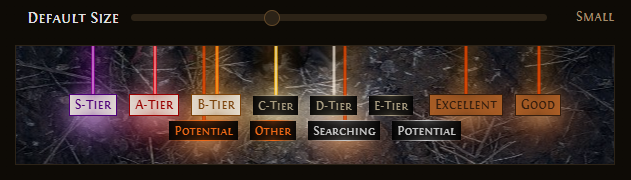 Author of https://poe2filter.com and https://poe1filter.com - Path of Exile 1 & 2 Custom Filter Generators
|
|
|
Custom Item Styles, Style Library, copy/paste styles - v1.1.156 - 23/05/2026
Custom Item Styles Until now, you could assign an Item Tier to many different types of equipment and other types of items; through the Item Tier Picker on the Quick Filters, or by dragging & dropping that type of item on the Item Tier List tab. You could already change the cosmetics of those entire tiers. And there are 'overrides' per category of items: My Equipment, Leveling or Salvaging Gear, Waystones, etc. But what if, for a particular categories of items, let's say 'My Rare Unidentified Gear', or 'Trial Relics', you want to pick an entirely different cosmetic? You now can. Using the Item Tier Picker on the Quick Filters, there's now an extra option which will open the Style Dialog. The Item Tier List tab will show you which items have their own cosmetics (which override that tier's default cosmetics). You can even preview or change the style, or reset it back to that tier's default style. But wait, there's more... Copy/paste styles and Style Library You can now copy and paste styles from and to anywhere in the tool: Drop Tiers, Custom Cosmetic Rules (behind the ⋯ menu), and the Style Dialog. Every time you Copy a style, it will be stored in the Library. Instead of just pasting your last-copied style, you can choose to paste from the Library too. If you enable the 'Paste from Style Library in Item Tier Picker' setting under 'Advanced Featurs' on the Settings tab, a second row gets added to the Item Tier Picker where you can open the Style Library, or immediately select one of your recently copied styles. Happy fine-tuning! Sticky active filter Your active filter will now be displayed on the right in the sticky menu, so you can easily access it from anywhere in the tool. 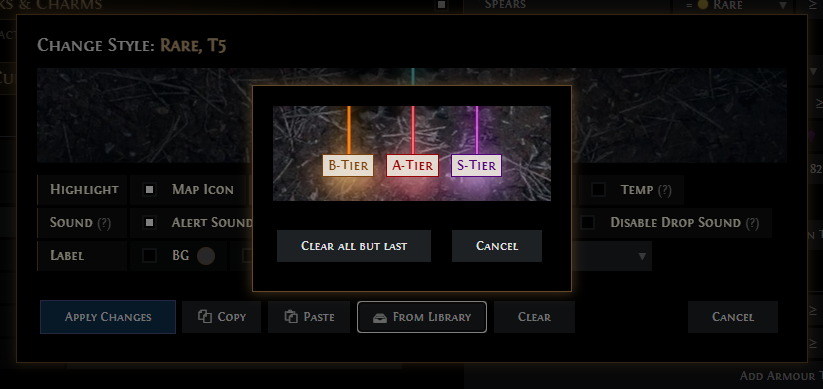 Author of https://poe2filter.com and https://poe1filter.com - Path of Exile 1 & 2 Custom Filter Generators
|
|
|
The tiering of gear is really seemless, much easier to use than FilterBlade. I do wish you had a "simulate" button though so we can test parts of our filter without having to go in-game.
Thanks for the great tool! IGN: Eso_Es
|
|
|
Item Library, Identified Item rules disabled - v1.1.157 - 25/05/2026
Item Library As you might know, you can always hover over any item ingame, press CTRL+C, and press CTRL+V anywhere in the tool to see if and how that item gets shown by the filter. Every time you paste an item this way, it will now get added to an 'Item Library'. All items in your library will then be visible on the Preview tab, if you have that option enabled. CTRL+click on such an item to remove it from the library. Identified Item rules disabled by default for PoE2 With GGG removing the 'Contains Identified Items' modifier on Strongboxes and removing random Rare items appearing in the Ritual rewards window, they have made clear that they want to move away from this mechanic entirely in Path of Exile 2. Identified item rules greatly increased the output size of the filter, adding almost 1370 lines by default, or an extra 70%. With the filter's output size potentially having a small performance impact, enabling this by default was no longer warranted. We've disabled these rules by default on all presets, and instead added a 'Show All Identified Items' rule. If however you are the kind of player to identify items, throw them on the ground without reading the mods, and keep what remains, then you can, of course, still opt in to this functionality, and continue to tweak it to your liking. Existing filters remain unchanged, although we advise you to enable 'Show All Identified' to reduce filter output and potentially improve item filtering performance. 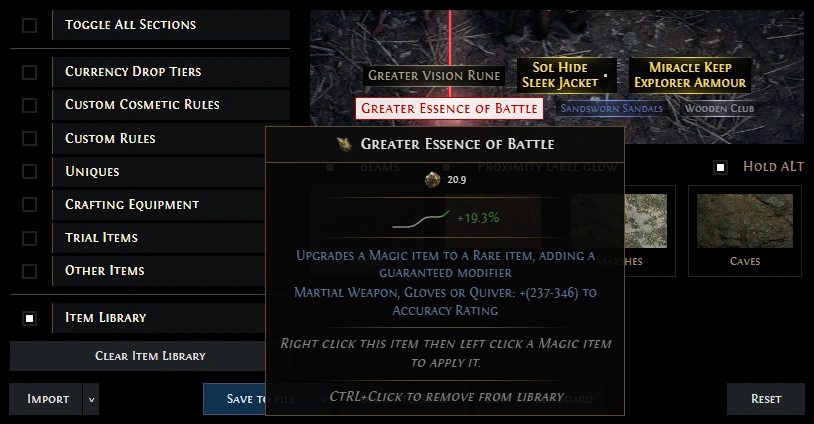 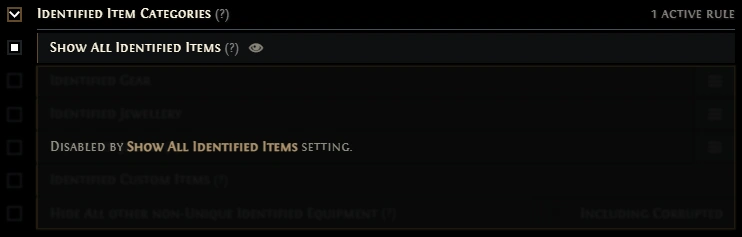 Author of https://poe2filter.com and https://poe1filter.com - Path of Exile 1 & 2 Custom Filter Generators
|
|





