


Struggling with intense "Blur" in Poe 2. How to fix? /Technical issue
" Set Window Resolution to 1920 x 1080 (or your monitor resolution) Set Render Resolution to No Upscale - 1920 x 1080 (or your monitor resolution) If the 2 others didn't do anything, change Upscale mode to OFF and/or set Mode to Windowed Fullscreen. Tech guy Last edited by Warrax#2850 on May 28, 2026, 2:37:27 PM
|

|
" Why are you playing in windowed mode? Image quality issues are most likely due to the low resolution and lack of anti-aliasing. But I don't think the GTX 1060 can handle FHD resolution. With the slightly better GTX 1660S, I have to play XeSS in Ultra Performance mode in high-end content. That's roughly 360p. The image will be a bit blurry in motion, but I think that's the best you can get. 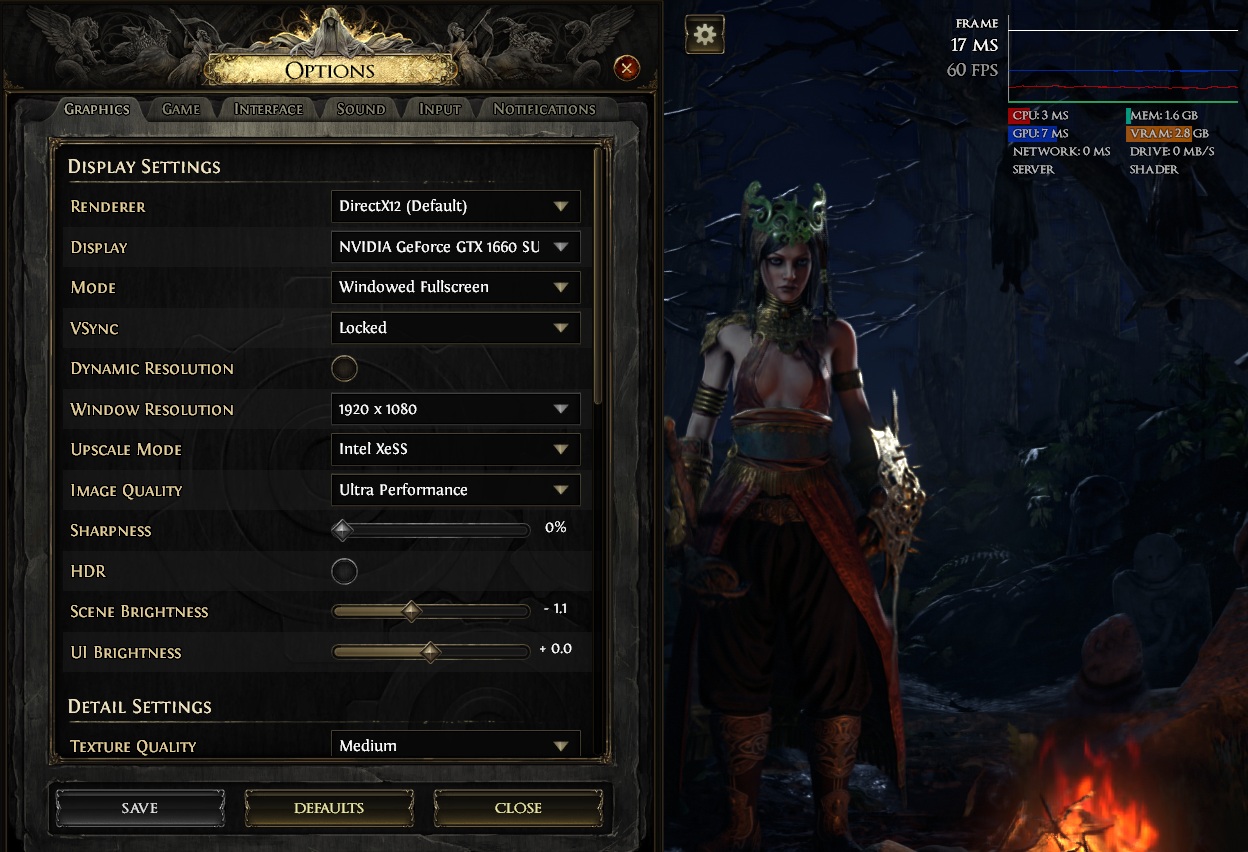 Last edited by Mindeclipse#1593 on May 28, 2026, 11:42:51 AM
|
|
" https://imgur.com/a/TomKC9t AH ITS FIXED!!!!!! god blesssssssssssssssssss. Okay the Problem was.: My render resolution was different from my window resolution. (For some reason?). It could be that it didnt auto adjust to my "windowed" screen in earlier versions of poe 2 and it always stayed "off". Now it auto fixes itself once selected to be 100%. Its GREAT the Game isnt blurred at all anymore! Thanks everybody. ! Last edited by Zurku351#2127 on May 29, 2026, 3:24:42 AM
|

|
|
Awesome! glad I could help.
Tech guy
|
|



