Improve Atlas loading effectiveness ahead of 0.5, else the new search functionality will struggle.
|
For those who don't know, when the Atlas reaches a certain size, the areas furthest from the player don't automatically load. They only begin to load once the player scrolls closer to them. Such loading takes place off-screen, so the player rarely ever notices it.
The problem becomes apparent when using Bookmarks. If a bookmark is located within an unloaded area of the Atlas, the player is teleported into grey mist/fog of war. 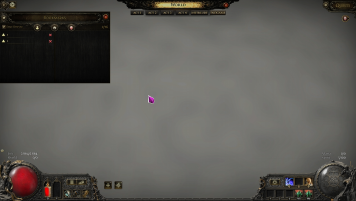 The worst part about this is, the grey mist doesn't simply rectify itself. The player has to manually scroll all the way to a loaded area of the Atlas, and only then will the Atlas recognise the need to start loading the unloaded area. Think of it like a domino effect. Here's an imperfect example, but you get the idea: 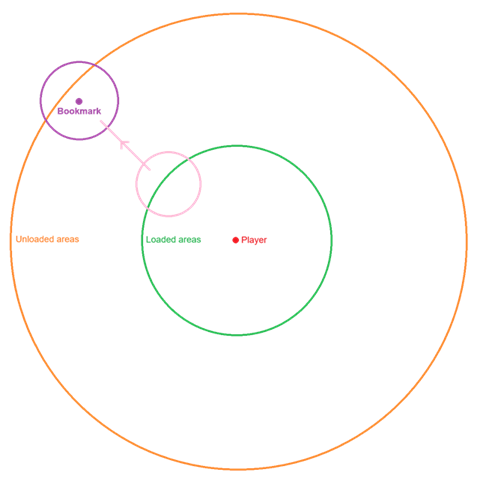 Assume that the entire area within the orange circle is already discovered, but, upon logging into the game, everything outside of the green circle remains unloaded. When you click the purple bookmark, you are teleported to the unloaded region, which remains unloaded (grey mist). In order to load it, you have to manually backtrack to the pink area so that the Atlas can create a data bridge between green and purple. Dominoes. Unless fixed or improved, the new search function will almost certainly lead to the same issue. Or, perhaps worse, the search function won't even be able to locate nodes within unloaded areas. Please don't allow this to become a sore point in 0.5 Technical limitations or not, this needs addressing. Whether that means fine-tuning the code, dumbing down the Atlas visuals, providing a means for the player to move to a fresh Atlas, or something else. Last edited by WaywornExile#0835 on May 25, 2026, 10:33:13 AM Last bumped on May 25, 2026, 10:40:02 AM
|

|
|
ello everyone,
I'm having screen loading issues. After starting the game it takes a long time for the login screen to appear. In the campaign, loading between zones takes a long time. Going into hideout takes so long that I go to the bathroom and come back and the screen still hasn't loaded, when I click on map divice I already want to uninstall the game. Very irritating. What I’ve Tried: - Reinstalled the game - Deleted the shader cache folder - Updated GPU drivers - Tried every graphics preset and individual setting - Verified game files - Disabled overlays - Checked SSD health and disk errors Symptoms: - Loading into any zone can take multiple minutes - No crash message — just infinite loading - Happens in all areas consistently System - RTX 5060 Ti 16gb (Drive GForce 596.49) - AMD Ryzen 5 5500X3D 6-Core Processor - RAM 32gb - Game installed on a NV2 |

|
" This thread is specific to a very particular loading issue. I'd recommend creating a fresh thread here for your issue. You'll have more luck with that. |
|